


In this month's edition of Tobe Tools, I share my organizational go-to's for computer window and browser tab management.
The day I got a second monitor at work was a game changer. Especially since my laptop screen was designed for portability over functionality and I was beginning to wear out my command + tab keys. After a year of happy two-screen working, I added a third screen to my home office.
Sure, three computer screens may sound a little excessive, but it works for me. I manage the extra screen space (i.e. additional open windows and browsers/tabs) with apps like Magnet and Session Buddy, plus a few organizational systems I've put in place to keep me in check.
But whether I'm working on three screens or one, I know how easy it is to experience window and tab overwhelm. If you feel the same way, check out our Tobe Tools of the Month. You’ll wonder how managed without them.
1. Magnet - Window Manager for Mac
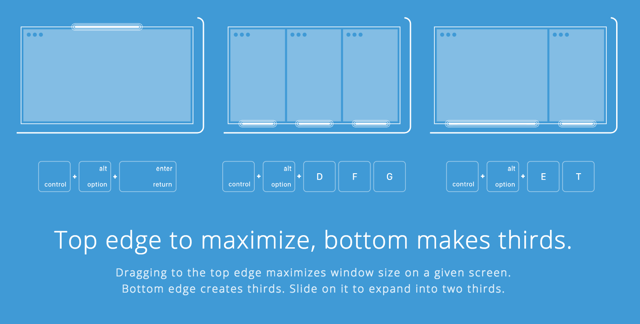
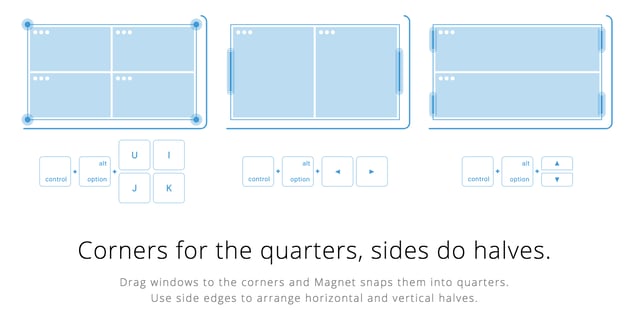
Magnet is a window snapping tool that allows you to resize your windows in fullscreen, half, quarter or thirds.
What sets it apart:
-
It works with the way you work, not against you, Magnet offers keyboard shortcuts, drag and drop functionality, and a drop-down menu.
-
Multi-screen friendly (supports up to six external displays!) and windows can also be arranged in active desktop space screens
-
Customizable keyboard shortcuts
What's missing:
- Mac only (Sorry, PC users. I've heard you have some similarly great options, though!)
Cost:
2. Session Buddy
Session Buddy is a Chrome extension that cuts down the clutter of open tabs by saving them as sessions that you can reference later.
What sets it apart:
-
Your open tab sessions are saved automatically, which means you don't have to manually save a session before closing your browser window and you can recover open tabs after computer crashes or OS restarts.
-
You also have the option of saving and naming sessions manually.
-
Ability to export your tab sessions as a list of tab titles and/or URLs, and in a variety of formats, such as Text, CSV, Markdown, etc.
What's missing:
- When reviewing past sessions, it lacks a drag and drop feature to rearrange and group the listed URLs. As a work around, you must open the tabs you want to group together and then save it a new session. Not a huge deal, but it’s an extra step.
- Lacks cloud storage for syncing across multiple computers, but there is always that option to export/import if needed. I use a separate cloud-based bookmarking tool, so for me, it hasn’t been a problem
Cost:
- Free! Although the developer accepts donations so that he can continue to improve the tool. He's also very active on the product's Google Forum and is open to suggestions.
Just remember, it will take some trial and error to figure out what tools and systems complement the way YOU work.
If you have a tool that you’d like to share, we’d love to hear about it! Leave a comment below or email info@tobeagency.co.