

In my last post, I wrote about planning a whole trip to Japan through an AI assistant. One pattern decided where my money went more than any other: if I could book online in two or three taps, I booked. If a business made me call or email, I moved on.
That is the booking test.
Online booking for local business is no longer a nice-to-have. It is the difference between getting chosen and getting skipped, now that customers (and increasingly their AI assistants) expect to finish the job without picking up the phone.
What the booking test is
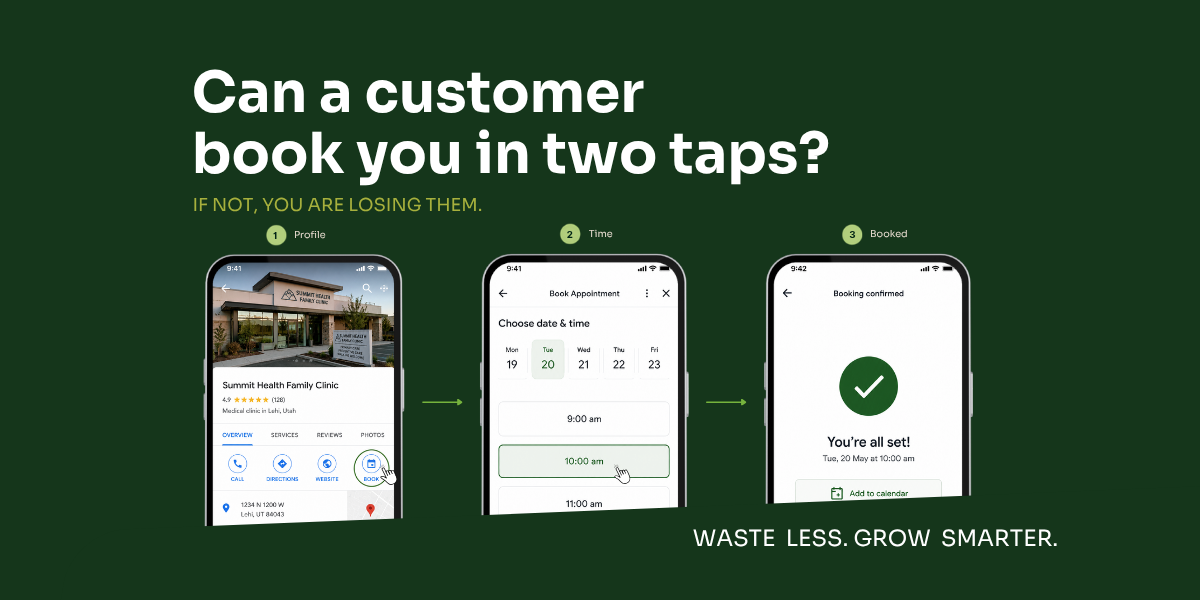
The booking test is one question: can a real customer go from “I want this” to “it is booked” in two or three taps, without calling, emailing, or filling out a long form? If yes, you pass. If no, you are leaking customers at the most expensive moment there is, the moment right after they decided to buy. You did all the hard work to get found, and then lost the sale on the last step.
The phone call used to be the convenience. Now it is the friction.
When I was on the go in a country where I do not speak the language, calling a business was never going to happen. That is not just a travel problem. Plenty of your customers are juggling a job, kids, and a phone at 9pm, and a phone call is the thing standing between them and booking you.
It is about to matter even more. At its 2026 conference, Google showed Search agents that book on the customer’s behalf, and for categories like home repair, beauty, and pet care, Google will even call the business for them (Google, May 2026). Think about what that means. If your booking is easy and works online, the assistant completes it. If it requires a human phone call, the assistant may simply skip you for the option that does not. Easy-to-book is becoming the default winner.
Start the booking test with your Google Business Profile
The fastest place to pass or fail is your Google Business Profile, because it is where most local decisions now happen. Does your profile have a working Book button? Can a customer reserve straight from it, through the feature Google calls Reserve with Google? For a lot of local businesses, turning that on is the single highest-leverage fix, which is why google business profile optimization is where we start. Get the categories, services, and booking integration right, and you become bookable in the exact place the customer decides.
Your website has to take the booking too
Your profile gets the customer to the door. Your website has to let them finish. A booking-ready site means the booking option is easy to find, fast, mobile-first, no more than two or three steps, and able to take a digital wallet. Tools like OpenTable, Calendly, Square, and FareHarbor all do the job. The brand matters far less than whether booking lives where the customer is and takes only a few taps. If your website design buries the booking link three clicks deep, you are failing the test even with good software behind it.
The proof is in the behavior, not the preference
This is measured, not a hunch. About 70% of consumers say they prefer booking online over calling, and 24/7 online booking can lift bookings by roughly 37% versus manual scheduling (Heallist, 2025). Your customers are already voting with their thumbs. The businesses that make booking effortless capture that demand. The ones that make people call hand it to a competitor.
Run the booking test on your own business
Take two minutes and try to book yourself, on a phone, the way a customer would.
- Open your Google Business Profile on a phone. Is there a Book button, and can you finish a booking from it?
- Is Reserve with Google set up for your category, if it is supported?
- On your website, count the taps from landing to booked. More than three is a leak.
- Does checkout or booking accept a digital wallet, or does it demand a long form?
- Is there any step that forces a phone call or a wait for a callback?
- On mobile, is the booking option visible without scrolling and hunting?
Where to start, based on where you are
If customers call to book and you wish they would not, then add a working Book button to your Google Business Profile first.
If you already have online booking but it is buried, then move it onto your profile and to the top of your site.
If you are getting found but not booked, then the leak is the booking step itself, not your visibility.
FAQ
What is the booking test? It is a simple check: can a customer book you in two or three taps, on a phone, without calling or emailing? If not, you are losing customers at the final step, right after they decided to buy.
Do I need Reserve with Google? If your category supports it, yes, it lets customers book straight from your Google Business Profile, which is where many decisions now happen. We set it up as part of profile work; you do not have to figure out the integration yourself.
What is the best online booking system for a small business? The best one is whichever your customers can finish in two or three taps from your profile and your site, with a digital wallet option. Tools like Calendly, Square, OpenTable, and FareHarbor all work. The system matters less than placing the booking where the customer already is.
Pass the booking test, and AI will book you
The businesses that win the next year are the ones that are easy to book, by a person or by that person’s assistant. Want to know if you pass? Book a free assessment with us to check. We run the booking test as part of it, alongside the rest of your profile and search setup. (New here? Start with AI Search for Local Business: A Field Report.)
Waste less. Grow smarter.